Claims attachments and CMS-0053: signed C-CDAs in the X12 275
By BioDream Developer, BioDream LLC
Payers regularly need clinical documentation to process a claim or a prior authorization request: an operative note, a discharge summary, test results. For years that documentation has travelled by fax and mail. CMS's health care attachments rulemaking (CMS-0053) moves it to electronic standards, with electronic signatures so the payer can trust what it receives.
This guide explains the pieces and how to produce and check them.
The standards involved
- X12 275: the "Additional Information to Support a Health Care Claim or Encounter" transaction, which carries the attachment. CMS-0053 adopts its 006020 version.
- HL7 C-CDA: the clinical document inside the 275, using the attachment document types HL7 defines.
- Electronic signatures: HL7's Digital Signatures and Delegation of Rights (DSDR) guide says how a document is signed so that a payer can verify who signed it, in what role and for what purpose.
What a strong signature looks like
A signature is only useful if it can still be checked years later. That is what the XAdES levels are for:
- XAdES-EPES: the signature and the signing policy.
- XAdES-T: plus a trusted RFC 3161 time-stamp, proving when it was signed.
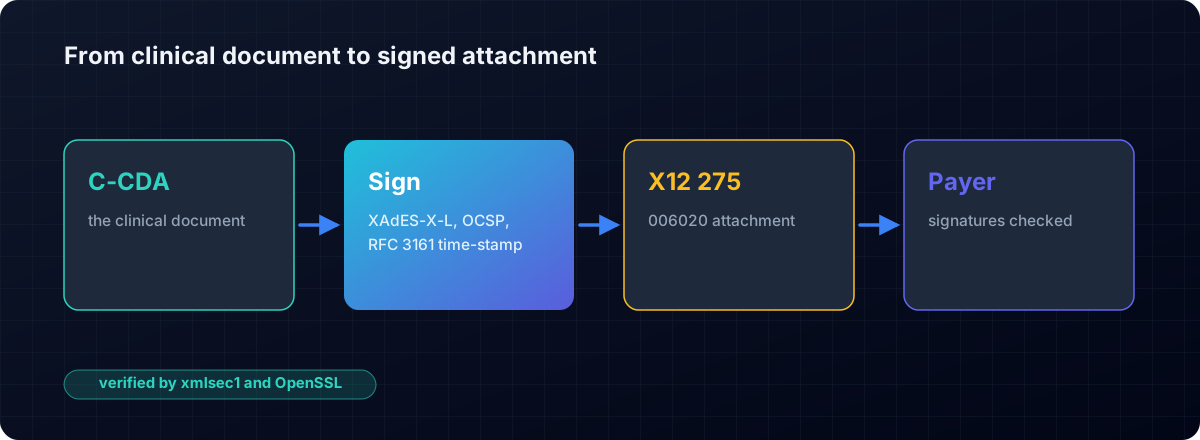
- XAdES-X-L: plus the certificate chain and revocation status (OCSP) at signing time, so the signature can be verified long after the certificates expire.
How Perfuse does it
Perfuse is a free, Apache-2.0 healthcare integration engine that builds and reads claims attachments, signatures included.
- X12 275 attachments in the 006020 form CMS-0053 adopts, built and read.
- C-CDAs signed to the HL7 DSDR guide, up to XAdES-X-L with OCSP and RFC 3161 time-stamps.
- The signer's role as a NUCC taxonomy code, the purpose from DSDR's code list, and whether they sign as legal authenticator or authenticator.
- Every signature checked on the way in, against the trust anchors you give it, with a report of the level reached and anything missing.
- Verified by xmlsec1 and OpenSSL, independent tools that did not write the signatures.
- C-CDA support beyond signing: documents read, validated and converted, including those base64-encoded inside HL7 v2 MDM messages, with a check that the human-readable narrative matches the coded entries.
Attachments are part of a complete payer and provider toolkit in the same engine: 837, 835, 270/271, 276/277, 834 and 278, Da Vinci CRD, DTR and PAS, and the CMS-0057 APIs.
Get started
- Download Perfuse from the latest release.
- Start it with a signing key:
perfuse serve -signing-cert cert.pem -signing-key key.pem -tsa-url https://your-tsa.example. - Read the manual for the attachment API.
Related: X12 278 and FHIR PAS · CMS-0057-F explained.
Perfuse on GitHub
Perfuse is free and open source under Apache 2.0. The source, every release, the issue tracker and the full documentation are on GitHub: github.com/biodream-llc/perfuse.
- Download the latest release for Linux, macOS or Windows
- Read the source
- Report an issue or ask a question