DICOM routing and de-identification: moving medical images safely
By BioDream Developer, BioDream LLC
Every CT, MRI, X-ray and ultrasound study travels as DICOM, the standard for medical imaging. Hospitals route studies between modalities, PACS, reading stations, AI services, cloud archives and research teams every minute of the day, and every study carries patient information that must be protected along the way.
This guide explains the DICOM services that move images, how routing works, what de-identification really involves, and how to do all of it in one engine.
The DICOM services
DICOM defines network services, each a message between two Application Entities, identified by their AE titles:
- C-ECHO: check that the other side is there, the DICOM "ping".
- C-STORE: send an image or other object.
- C-FIND: query for patients, studies, series or instances.
- C-MOVE: ask a system to send studies to a third destination.
- C-GET: retrieve studies over the same connection.
Routing
An imaging router receives studies and decides where each one goes. Typical rules:
- by modality: CT to the CT reading group, mammography to breast imaging
- by sending AE title or receiving AE title
- by study description, body part or referring physician
- copies to an AI service or a cloud archive alongside the PACS
Routing also bridges imaging to the rest of the record: a completed study often needs to appear in the EHR as an HL7 v2 message or a FHIR resource.
De-identification
Research, AI training, teaching files and second opinions need images without the patient. De-identifying DICOM properly means:
- removing or replacing the patient name, ID and birth date, and the other identifying attributes the DICOM standard lists
- stripping private tags, where vendors often store identifying data
- setting new AE titles and identifiers so the study cannot be traced back
Doing it inside the routing pipeline, rather than as a separate manual step, means no study leaves for a research archive with the patient still in it.
How Perfuse does it
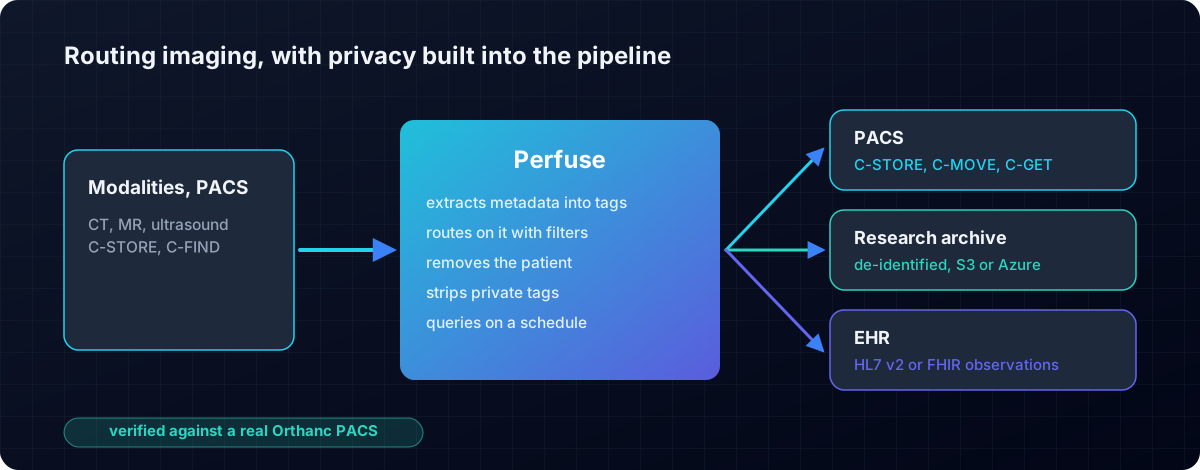
Perfuse is a free, Apache-2.0 healthcare integration engine with DICOM built in, in both directions.
- All five services: C-STORE, C-FIND, C-ECHO, C-MOVE and C-GET, sending and receiving.
- A DICOM query source: schedule a C-FIND, and each result becomes a message to route.
- De-identification as a pipeline step: remove the patient, strip private tags, set the AE title.
- Metadata extraction into tags that filters can read, so routing rules use the study's own attributes.
- Window and frame selection for derived images.
- Studies converted into observations that travel onward as HL7 v2 or FHIR, so the EHR knows a study is done.
- Any destination: another PACS over DICOM, files, SFTP, Amazon S3 (Glacier included), Azure Blob Storage, HTTP and more.
- Verified against a real Orthanc PACS: the instance arrives, and the patient name, identifier, study date, modality and SOP class all survive. The check reads Orthanc's own catalogue.
And imaging runs in the same engine as everything else: HL7 v2, FHIR, X12 and CDA, with a durable queue, monitoring, alerts and a full web console, in one file with nothing else to install.
Get started
- Download Perfuse from the latest release.
- Run
perfuse serve, open http://127.0.0.1:8080 and create a channel with a DICOM source. - Read the manual for every DICOM option.
Related: HL7 v2 to FHIR · Open-source integration engines compared.
Perfuse on GitHub
Perfuse is free and open source under Apache 2.0. The source, every release, the issue tracker and the full documentation are on GitHub: github.com/biodream-llc/perfuse.
- Download the latest release for Linux, macOS or Windows
- Read the source
- Report an issue or ask a question