Mirth Connect 4.6 licence change: your options, and the fastest way forward
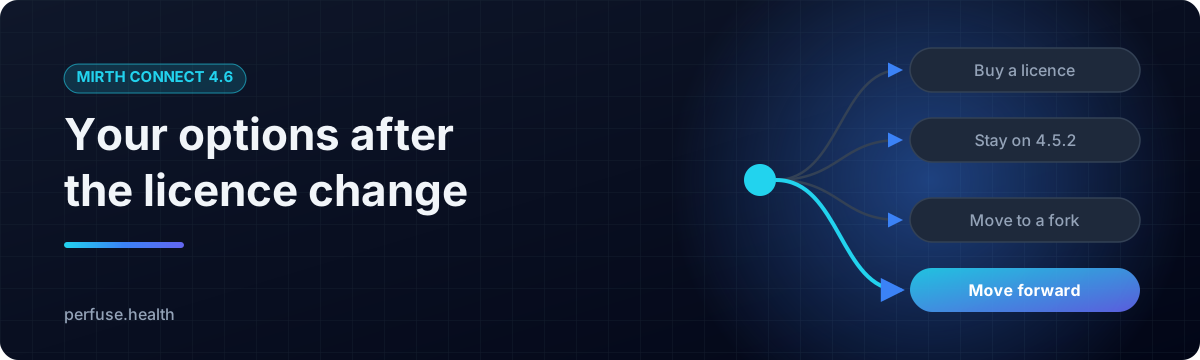
In March 2025 NextGen Healthcare moved Mirth Connect to a commercial licence. From version 4.6 onwards a paid licence is required, and the open-source line stays at 4.5.2.
For the thousands of hospitals, labs, imaging centres, payers and consultants who built their interfaces on Mirth, that raises one question: what now?
This guide sets out the options and then shows the one that gets you furthest for the least effort: Perfuse, a free, Apache-2.0 healthcare integration engine that reads your Mirth channels, runs your Mirth JavaScript unchanged, and goes well beyond what Mirth ever did.
Your four options
- Buy the Mirth 4.6 licence. You keep your current setup and take on a recurring cost.
- Stay on Mirth 4.5.2. It keeps running, but it is the last open-source release, so no upstream updates are coming.
- Move to an open-source Mirth fork, Open Integration Engine (OIE) or BridgeLink. Both are community continuations of the Mirth 4.5.2 code base, on Java, with the same architecture.
- Move to a modern engine that already speaks Mirth. That is Perfuse: your channels come across, your scripts run, and you gain a new generation of capabilities on top.
Options 1 to 3 keep you where you are. Option 4 moves you forward, and with Perfuse it is a move you can make one channel at a time, with proof at every step.
Meet Perfuse
Perfuse is an open-source healthcare integration engine written in Go. It moves clinical data between systems in HL7 v2, FHIR R4/R4B/R5, DICOM, X12, C-CDA and CDA, and HL7 v3, over 20 source types and 22 destination types: MLLP, TCP, HTTP, SOAP, files, FTP, SFTP, SMB, WebDAV, databases, DICOM, Kafka, AMQP 1.0 (Azure Service Bus, RabbitMQ), Azure Blob Storage, and AWS S3, SQS and SNS.
And it is one file. Download it, run it, open your browser.
One file, twelve times lighter
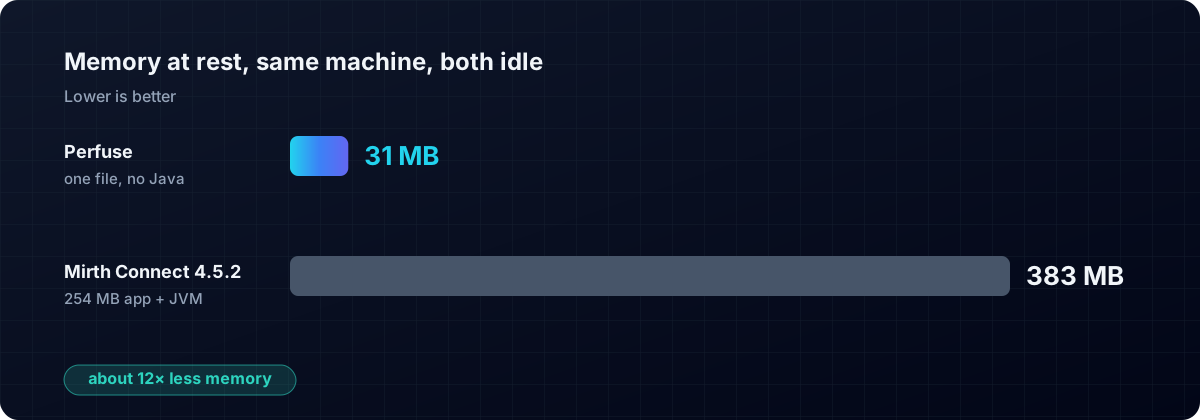
| Perfuse | Mirth Connect 4.5.2 | |
|---|---|---|
| Memory at rest | 31 MB | 383 MB |
| What you install | one file (about 20 MB to download) | a 254 MB application plus a Java runtime |
| Runtime to install first | none | OpenJDK 17 |
| Processes | 1 | JVM plus application server |
| Startup | immediate | JVM boot and warm-up |
Measured on the same machine, both idle.
There is no Java to install, patch or tune, no application server, and no database to stand up first. The web console is built into the binary. Perfuse runs on Linux, macOS and Windows, on Intel and ARM, as a systemd unit, a launchd service or a Windows service. On Windows you simply double-click it. The Linux build is fully static, so it runs in a scratch container with nothing else inside.
Your Mirth channels, running in minutes
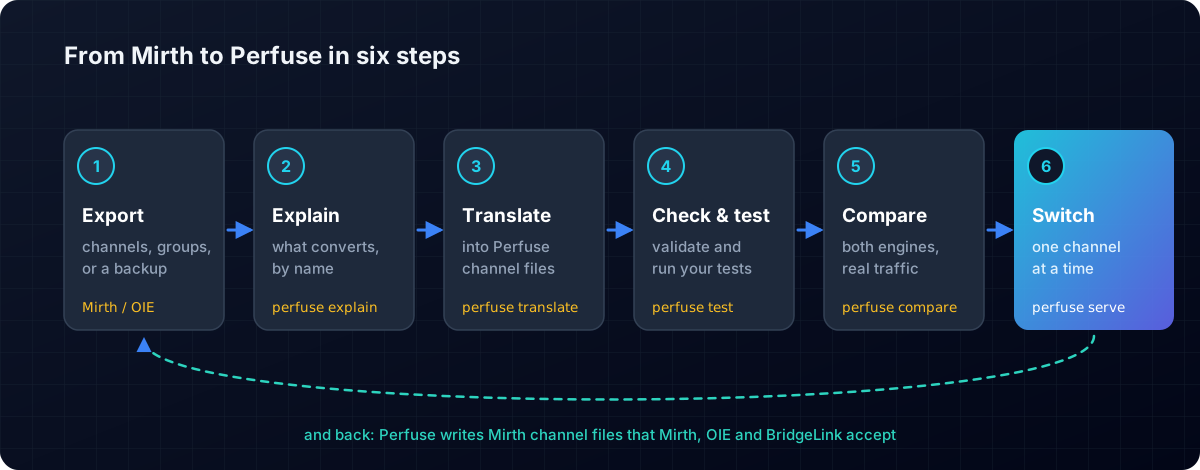
Perfuse was built for this migration from the first line of code.
- Your Mirth JavaScript runs unchanged. E4X,
msg['PID']['PID.5']['PID.5.1'],for each, XML literals,channelMap,$(),DateUtil,SerializerFactory: the Mirth dialect is supported as it is. perfuse explainreads a Mirth export and tells you, channel by channel and by name, exactly what converts, before you commit to anything.perfuse translateconverts a single channel, a channel group, a code template library or a whole server backup into Perfuse channels in one step.- It works for every Mirth flavour. Perfuse is verified against Mirth Connect 4.5.2, Open Integration Engine 4.5.2 and 4.6.0, and BridgeLink 26.9.0, and every build translates and runs a test corpus written on each of those engines.
- And you can export back. A channel built in Perfuse can be written as a Mirth channel file that Mirth, OIE and BridgeLink all accept, verified across ten transport pairs. You can move in both directions, so trying Perfuse carries no risk.
perfuse compareruns two engines over the same traffic and proves they produce the same output, so you can switch over with evidence rather than hope.- A lock-in audit lists the Java dependencies in your existing channels, so you know exactly what you are working with.
A typical migration looks like this:
perfuse explain mirth-backup.xml        # what converts, by name
perfuse translate -o channels/ mirth-backup.xml
perfuse serve -channels channels/       # open http://127.0.0.1:8080
What you gain that Mirth never had
Change live interfaces without guessing
- Shadow mode runs a new version of a channel next to the live one, on real traffic, delivering nothing, and shows you field by field where the two differ. You can change a working interface and know the result before it goes live.
- Feed contracts declare what a feed should contain (fields, code sets, cardinalities) and alert you the moment a sender changes something. Silent upstream changes are among the most common causes of interface trouble, and Perfuse catches them.
perfuse profilereports what is actually inside a feed, and what changed.
Messages that are never lost
- A durable on-disk queue per destination, so one slow receiver never holds up the others.
- Order is preserved: message 2 waits until message 1 is delivered.
- Retries with exponential backoff and dead-lettering that keeps every message.
- Acknowledgements are sent after delivery by default, so a sender is told "received" only when it is true.
FHIR as a first-class citizen
- A real HL7 v2 to FHIR mapper: ADT to Patient and Encounter, ORU to Observation and DiagnosticReport, SIU to Appointment, MDM to DocumentReference, VXU to Immunization.
- US Core 9.0.0 for USCDI v6 output that passes the official HL7 validator with no errors.
- A built-in FHIR REST server, FHIR subscriptions, bulk export, and a
fhirdestination type, so a v2 feed can deliver straight to a FHIR API. - A browser FHIR lab: paste v2 in and read and validate the FHIR that comes out.
CMS-0057 and Da Vinci, built in
Payers face the CMS-0057 deadline on 1 January 2027. Perfuse ships the whole stack:
- The four payer APIs: Patient Access, Provider Access, Payer-to-Payer and Prior Authorization, with a screen showing which are ready on your instance.
- Da Vinci CRD 2.2.1, DTR 2.2.0 and PAS 2.2.1: coverage requirements over CDS Hooks, documentation questionnaires, and a full prior authorization server with
$submit,$inquireand a reviewer's$decide. - Da Vinci PAS mapped to and from the X12 278, so a payer on either side is reachable.
- CARIN Blue Button 2.2.0 from your 837s and 835s, PDex prior authorizations,
$member-match, and the yearly prior authorization metrics page in CMS's own layout.
And it is tested with Inferno, the test kits ONC uses: SMART App Launch STU2.2 80 of 80, the CRD Server 2.2.1 suite passes, PAS Server 2.2.1 82 of 84 and DTR Payer 2.2.0 43 of 45.
Every format a health system meets
- DICOM: C-STORE, C-FIND, C-ECHO, C-MOVE and C-GET in both directions, scheduled DICOM queries, and de-identification as a pipeline step. Verified against a real Orthanc PACS.
- X12 parsed as a true structure: 837, 835, 270/271, 276/277, 834 and 278, plus signed X12 275 claims attachments for CMS-0053.
- C-CDA and CDA, including documents base64-encoded inside an MDM, with a check that the human-readable narrative matches the coded entries.
- Public health: eCR case reports with Reportability Responses, and ELR lab reporting.
- TEFCA and UDAP for exchanging records nationally, with every exchange audited to disk.
- SMART Health Links and Cards for CMS's "Kill the Clipboard" initiative.
Enterprise security, included
- SAML 2.0, verified against real Keycloak and Microsoft Entra, set up by pasting the provider's metadata.
- OpenID Connect, LDAP and Active Directory, passkeys, SCIM 2.0 provisioning and mutual TLS.
- A built-in SMART on FHIR authorization server.
- Role-based access, API tokens, an audit log of who changed what, and PHI access monitoring that spots unusual volume, after-hours and bulk access.
Operations you will actually enjoy
- A live dashboard and a flow map with a time scrubber: drag back to any moment and see which feeds went quiet.
- Prometheus metrics, OpenTelemetry tracing, and eleven alert types, including "below rhythm", which notices a feed running quieter than its own history.
- Find a patient's messages by typing what you know, an MRN, a name, a date of birth or a claim number, across HL7 v2, FHIR, DICOM and X12 at once.
- A fleet view across every instance, and multi-tenancy, included at no cost.
- Everything in the browser. Anything a configuration file can do, the web console can do too.
Scripting your way
Run your existing JavaScript, write new scripts in sandboxed Lua, or use eleven declarative steps (set, copy, map, date, pad and more) that need no code at all. Shared mapping tables record who decided each mapping and why.
Proven against real software
Perfuse is tested against the real systems it talks to, not imitations of them: Mirth, OIE and BridgeLink; HAPI FHIR; the official HL7 validator; Inferno; Orthanc; OpenSSH; PostgreSQL; OpenSSL; Keycloak and Microsoft Entra; LocalStack for AWS; and NIST's HL7 v2 validator.
Free, open and yours
Perfuse is licensed under Apache 2.0: free to use, modify and run in production, commercially or not, with no licence keys, no user limits and no paid tiers inside the product. Every release ships with checksums and a CycloneDX software bill of materials.
Get started in two minutes
- Download Perfuse for your platform from the latest release.
- Run
perfuse serve(on Windows, double-clickperfuse.exe). - Open http://127.0.0.1:8080, sign in, and import your first Mirth channel.
- Source and downloads: https://github.com/biodream-llc/perfuse
- Manual: https://perfuse.health/manual/
- Website: https://perfuse.health
Perfuse is built by BioDream LLC.
Mirth and Mirth Connect are trademarks of their respective owners, used here only to describe compatibility.
Related: How to migrate Mirth Connect channels, step by step · CMS-0057-F explained.