Prior authorization metrics under CMS-0057-F: what payers must publish, and how
By BioDream Developer, BioDream LLC
From 2026, CMS-0057-F requires impacted payers to publish their prior authorization performance every year, on a public page of their website. The goal is transparency: patients, providers and employers can see how often a plan approves and denies, and how long decisions take.
This guide explains what has to be published and how to produce it from the data a utilization management system already holds.
Who publishes, and when
Medicare Advantage organizations, state Medicaid and CHIP fee-for-service programs, Medicaid managed care plans, CHIP managed care entities, and Qualified Health Plan issuers on the federal exchanges each publish the metrics once a year. The first report, covering 2025, was due by 31 March 2026.
What the page must show
- The list of all items and services that require prior authorization, described in plain language.
- The percentage of standard requests approved, and the percentage denied.
- The percentage of standard requests approved after an extension of the decision timeframe.
- The percentage of requests approved after appeal.
- The same figures for expedited requests.
- The average and median time between submission and decision, for standard and for expedited requests.
Drugs are outside the rule's prior authorization provisions, so they are left out of the metrics too.
Where the data comes from
Every utilization management system records, for each request: when it arrived, its priority, when it was decided, the decision, whether the timeframe was extended, and whether it was appealed and how. That is all the metrics need. The work is in counting correctly: which requests fall in the year, how partial approvals and pending requests are treated, and how to report time with its unit, every time.
How Perfuse does it
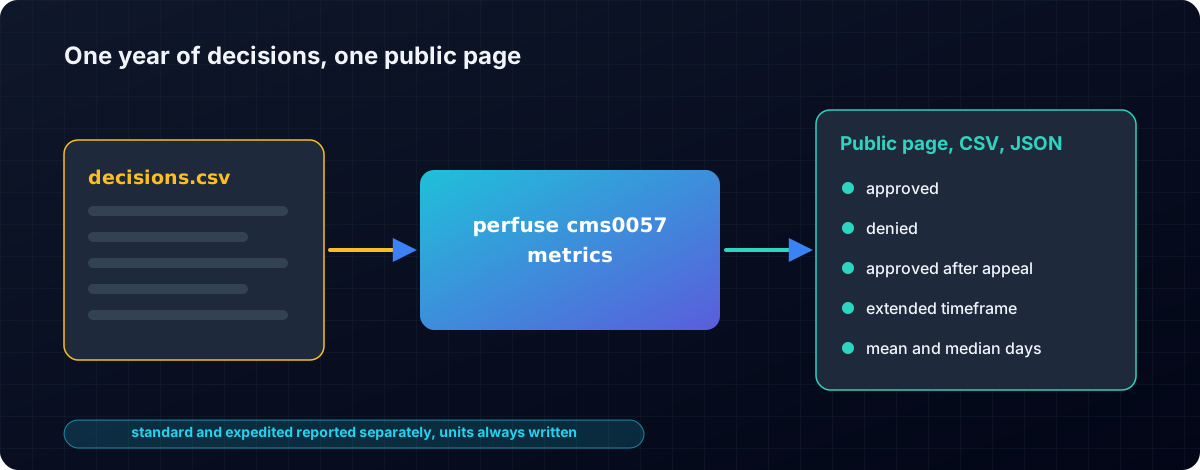
Perfuse is a free, Apache-2.0 healthcare integration engine that produces the metrics in the layout of CMS's own template.
perfuse cms0057 metrics -year 2025 -org "Springfield Health Plan" \
-services services.csv -format html decisions.csv > prior-auth-metrics.html- Reads a plain CSV export from any utilization management system. Columns are found by name, in any order: request id, line of business, priority, received, decided, decision, extended, appealed, appeal decision, service code and description.
- Every metric the rule names, standard and expedited reported separately, for each line of business.
- Approvals and denials within the timeframe, after an extension and after appeal.
- Mean and median decision time, always with the unit written.
- The timeframes you operate under: 72 hours and 7 days by default, adjustable for plans with different timeframes.
- Data quality reported plainly: rows that cannot be read are listed with their line numbers, requests still pending or decided outside the year are counted and excluded, and a missing services list is flagged.
- Three outputs: a self-contained public HTML page ready to publish, CSV with one row per metric, and JSON.
The metrics sit alongside everything else CMS-0057 asks of a payer, in the same engine: the Patient Access, Provider Access, Payer-to-Payer and Prior Authorization APIs, CARIN Blue Button, PDex, and Da Vinci CRD, DTR and PAS.
Get started
- Download Perfuse from the latest release.
- Export last year's decisions to CSV and run
perfuse cms0057 metrics. - Read the manual for the column formats.
Related: CMS-0057-F explained · Da Vinci CRD, DTR and PAS.
Perfuse on GitHub
Perfuse is free and open source under Apache 2.0. The source, every release, the issue tracker and the full documentation are on GitHub: github.com/biodream-llc/perfuse.
- Download the latest release for Linux, macOS or Windows
- Read the source
- Report an issue or ask a question