 Perfuse
Guide
The quiet feed: why hospital interfaces fail silently, and how to notice
The quiet feed: why hospital interfaces fail silently, and how to notice
In one minute
- The most dangerous interface failure produces no error at all. A feed simply stops, and nothing complains.
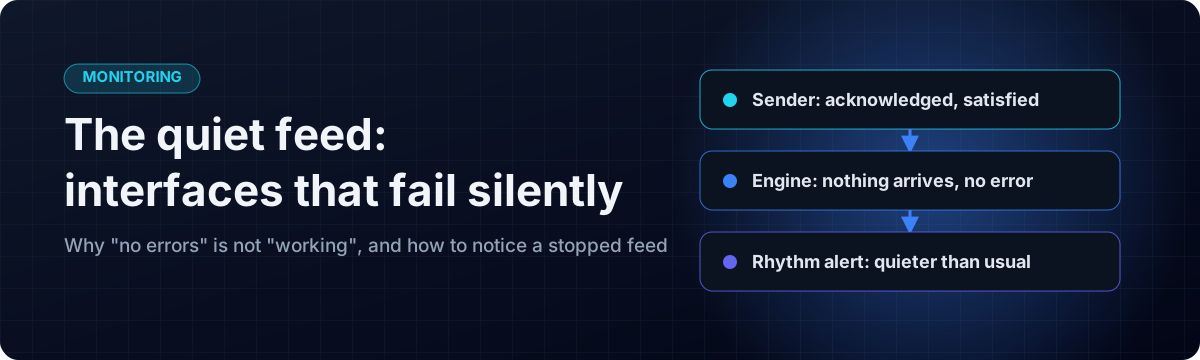
- The sending system is satisfied, the engine has nothing to count, and the receiving system has no way to know a message was due.
- A fixed "no traffic for two hours" alarm cannot work on most clinical feeds: they are quiet every night and every weekend.
- The fix is to compare each feed with its own normal week, hour by hour, and to say "I cannot tell" when the history is too thin, rather than guess.
- Perfuse has this built in as the
below-rhythmalert, beside the usual error, queue and channel alerts.
Who this is for
This is for the people who look after a hospital's, lab's or health plan's interfaces, and for the managers who have had to explain a week of missing results. No programming needed.
How a feed dies quietly
Picture a lab result feed. One night the lab system's outbound queue jams after an update, or a firewall rule changes, or a certificate expires on a connection nobody remembers setting up. From then on:
- The lab system thinks it is fine. It may not even have tried to send.
- The integration engine sees no messages, and no messages means no failures. Every dashboard shows green.
- The patient record has no way to know that a result is missing. Absence looks exactly like a quiet day.
Days later a doctor asks why a patient's results never arrived. By then the gap may be hundreds of messages wide, and the clinical risk was real the whole time.
Why a simple timer is not enough
The obvious answer is a timer: "alert if nothing arrives for two hours". On a feed that is busy around the clock, that works. On most clinical feeds it does not:
- An outpatient lab is silent every night and all weekend. A two-hour timer pages someone at one in the morning, every night, until they switch it off.
- A timer long enough to survive the weekend, say sixty hours, will not notice a Tuesday morning outage until Thursday.
There is no single number that is right for both, because the question "has this feed stopped?" depends on when you ask it. Normal traffic can differ a hundredfold between Monday at ten and Sunday at three.
Compare each feed with its own week
The better question is: is this feed much quieter than it usually is at this hour of this day of the week?
To answer it, keep a picture of each feed's normal week: for each of the 168 hours of the week, what traffic usually looks like. Three details make the difference between an alert people trust and one they mute:
- Use the median, not the average. One backlog flush of forty thousand messages drags an average so high that the feed could then go silent without ever falling below it. The median shrugs off one extraordinary hour.
- Judge reliability by the low end. An alert about a feed being too quiet fires when traffic is low, so it is the low end of the history that says whether it will cry wolf. A low percentile works better than the minimum, which a single bank holiday drags to zero.
- Say when you cannot tell. A brand-new channel has no history, and a new channel must not look like a broken one. Where the history is too thin or too erratic to support a judgement, it is better to decline than to guess.
The other alerts every clinical feed needs
The quiet feed is the failure nobody else reports, but it is not the only one. A sensible set for any feed that matters:
- Quieter than its rhythm: the feed has gone quiet when it should not be quiet.
- Error rate: messages arrive and fail.
- Queue age: something is stuck rather than merely busy.
- Channel down: the connection is not running at all.
And an alert must reach a person. One written only to a log nobody reads is not an alert.
How Perfuse does it
Perfuse learns each channel's week from its own message history and offers below-rhythm as one of eleven alert kinds, next to error rate, queue depth and age, a stuck queue, no traffic, channel down, script errors, quarantined database rows, slow delivery and feed-contract violations. The default fires when traffic falls below four fifths of what is normal for that hour. A channel with no history is left out rather than flagged, and where the history cannot support a judgement it says so.
Alerts go to a webhook (Slack, Teams, Mattermost, PagerDuty, Alertmanager or anything that takes a POST), to SNMP managers as traps, or to the log for a collector. The rules are set in the console, per channel or for all of them, and take effect without a restart. A related tool, feed contracts, catches the other quiet failure: a sender that keeps sending but has changed what it sends.
What it does not do: it cannot tell you why a sender stopped, only that it has, and when.
Get started
- Download Perfuse from the latest release, or look around the public test server (username
demo, passwordtry-perfuse-demo). - Open Alerts, add a
below-rhythmrule to your busiest feed, and point it at your team's chat. - The manual's alerting chapter explains every alert kind and setting.
Perfuse on GitHub
Perfuse is free and open source under Apache 2.0. The source, every release, the issue tracker and the full documentation are on GitHub: github.com/biodream-llc/perfuse.
- Download the latest release for Linux, macOS or Windows
- Read the source
- Report an issue or ask a question